FTP vs SFTP vs Git: Best Deployment Method for Web Development (2026 Guide)
0 likes | 1 Views
Confused between FTP, SFTP, and Git for website deployment? This in-depth guide compares FTP vs SFTP vs Git based on security, version control, collaboration, scalability, and real-world use cases. Learn when to use FTP for simple uploads, why SFTP is better for secure transfers, and how Git streamlines modern development workflows for teams and growing projects. Choose the right deployment method for your website in 2026.


FTP vs SFTP vs Git: Best Deployment Method for Web Development (2026 Guide)
E N D
Presentation Transcript
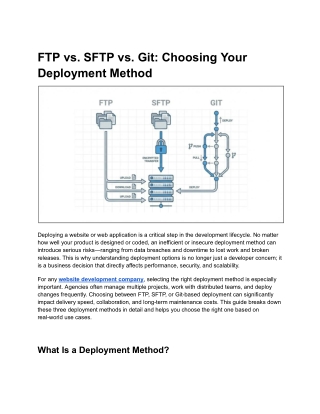
FTP vs. SFTP vs. Git: Choosing Your Deployment Method Deploying a website or web application is a critical step in the development lifecycle. No matter how well your product is designed or coded, an inefficient or insecure deployment method can introduce serious risks—ranging from data breaches and downtime to lost work and broken releases. This is why understanding deployment options is no longer just a developer concern; it is a business decision that directly affects performance, security, and scalability. For any website development company, selecting the right deployment method is especially important. Agencies often manage multiple projects, work with distributed teams, and deploy changes frequently. Choosing between FTP, SFTP, or Git-based deployment can significantly impact delivery speed, collaboration, and long-term maintenance costs. This guide breaks down these three deployment methods in detail and helps you choose the right one based on real-world use cases. What Is a Deployment Method?
A deployment method defines how code and files move from a local development environment to a live server. It determines: ● How securely files are transferred ● How changes are tracked or rolled back ● How teams collaborate ● How automation is handled The three most commonly used deployment approaches in web development are: ● FTP (File Transfer Protocol) ● SFTP (Secure File Transfer Protocol) ● Git-based deployment Each serves a different purpose and maturity level in modern development workflows. What Is FTP (File Transfer Protocol)? FTP is one of the oldest and most widely recognized file transfer methods on the internet. It allows users to upload, download, and manage files on a remote server using an FTP client. How FTP Works FTP follows a client–server architecture: 1. A user connects to a server using an FTP client (such as FileZilla) 2. Authentication is done using a username and password 3. Files are transferred over port 21 (control channel) and additional ports for data transfer FTP can operate in: ● Active mode – server initiates data connections ● Passive mode – client initiates all connections (more firewall-friendly) Advantages of FTP Despite being outdated, FTP still has some practical advantages: ● Easy to use: Minimal setup and learning curve ● Widely supported: Almost all hosting providers support FTP ● Good for simple sites: Static websites or one-off uploads Limitations of FTP
FTP has serious drawbacks that make it unsuitable for modern production environments: ● No encryption: Credentials and data are sent in plain text ● Security risks: Vulnerable to interception and brute-force attacks ● No version control: No history, rollback, or change tracking ● High risk of human error: Accidental overwrites or deletions When FTP Makes Sense FTP may still be acceptable for: ● Personal or hobby websites ● Legacy systems with no security requirements ● Non-sensitive static content For anything beyond that, FTP is generally discouraged. What Is SFTP (Secure File Transfer Protocol)? SFTP is often confused with FTP, but it is an entirely different protocol. SFTP is built on SSH (Secure Shell) and provides encrypted file transfers. How SFTP Works SFTP operates over: ● SSH protocol ● Port 22 ● Encrypted authentication and data transfer Users can authenticate using: ● Username and password ● SSH key pairs (recommended) Benefits of SFTP Over FTP SFTP addresses nearly all of FTP’s security weaknesses: ● Encrypted transfers: Protects data and credentials ● Secure authentication: Supports key-based access ● Firewall-friendly: Uses a single port ● Compliance-ready: Suitable for regulated environments
Drawbacks of SFTP Despite its security improvements, SFTP still has limitations: ● No built-in version control ● Manual deployment process ● Limited automation ● Not ideal for large teams or frequent updates Best Use Cases for SFTP SFTP works well for: ● Small businesses deploying securely ● Freelancers managing client servers ● Website maintenance with low deployment frequency It is a secure improvement over FTP, but still not a modern deployment workflow. What Is Git-Based Deployment? Git-based deployment uses Git version control systems to manage, track, and deploy code. This is the standard approach in modern software development. How Git Deployment Works A typical Git deployment workflow looks like this: 1. Developers push code to a remote repository (GitHub, GitLab, Bitbucket) 2. The server pulls the latest changes or receives them via CI/CD 3. Automated scripts handle builds, tests, and deployment Common deployment models include: ● Pull-based deployment (server pulls from repo) ● Push-based deployment (CI/CD pushes to server) Key Advantages of Git Deployment Git is far more than a deployment tool—it is a full collaboration system: ● Complete version history ● Instant rollbacks
● Branching and merging ● Team collaboration ● Automated testing and deployment ● Environment consistency For agencies and product teams, Git is a foundational tool. Challenges of Git Deployment Git does introduce complexity: ● Learning curve for non-technical users ● Requires workflow discipline ● Initial setup effort for CI/CD pipelines However, these challenges are minor compared to the long-term benefits. When Git Is the Best Choice Git-based deployment is ideal for: ● Medium to large projects ● Teams working collaboratively ● Frequent updates and releases ● DevOps-driven environments ● Any professional website development company FTP vs. SFTP vs. Git: A Detailed Comparison Security Comparison ● FTP: No encryption, high risk ● SFTP: Encrypted via SSH, secure ● Git: Secure via SSH keys, tokens, and access controls Git and SFTP are both secure, but Git provides better access governance and auditability. Deployment Speed & Automation ● FTP: Manual and slow ● SFTP: Manual but secure ● Git: Automated via CI/CD pipelines
Automation significantly reduces deployment time and errors. Version Control & Rollbacks ● FTP: None ● SFTP: None ● Git: Full version history and instant rollback This alone makes Git the superior option for most teams. Collaboration & Workflow ● FTP: Single-user focused ● SFTP: Limited collaboration ● Git: Designed for teams, branching, reviews, and approvals Comparison Table: FTP vs. SFTP vs. Git Feature FTP SFTP Git Encryption No Yes Yes Version Control No No Yes Automation No Limited Full Team Collaboration Poor Limited Excellent Rollback Support No No Yes Best For Legacy sites Secure file transfer Modern development Which Deployment Method Should You Choose? Based on Project Size ● Small static sites: SFTP ● Growing websites: Git + SFTP
● Large applications: Git with CI/CD Based on Team Structure ● Solo developers: SFTP or Git ● Small teams: Git ● Distributed teams: Git with automation Based on Security Requirements ● Low-risk content: SFTP ● Sensitive data: Git with secure pipelines ● Compliance-driven projects: Git + access control Can You Combine Git with FTP or SFTP? Yes, hybrid workflows are common. Git + SFTP Workflow ● Git for version control ● Server pulls updates via SFTP or SSH Pull-Based Deployment ● Server fetches latest code from repository ● Reduces exposure to production credentials This approach works well for shared hosting or restricted environments. Common Deployment Mistakes to Avoid ● Using FTP for production environments ● Deploying without version control ● Making changes directly on live servers ● Skipping staging environments ● Not backing up before deployment These mistakes often lead to downtime, security incidents, and lost revenue.
Best Practices for Modern Website Deployment ● Always use encrypted protocols ● Adopt Git, even for small projects ● Automate deployments where possible ● Use staging and testing environments ● Restrict production access ● Document deployment workflows These practices improve reliability and scalability over time. Final Verdict: FTP vs. SFTP vs. Git FTP is outdated and insecure for modern development. SFTP is a secure alternative for simple deployments but lacks collaboration and automation. Git is the clear winner for professional development, offering security, version control, automation, and scalability. For any modern website development company, Git-based deployment is no longer optional—it is the industry standard. Even if your current setup relies on SFTP, transitioning to Git will improve efficiency, reduce errors, and future-proof your workflow.
















![[EbooK Epub] The Wim Hof Method: Activate Your Full Human Potential Full](https://cdn5.slideserve.com/11098393/slide1-dt.jpg)
![[PDF] Free Download The Jakarta Method: Washington's Anticommunist Crusade and the Mass Murder Program That Shaped Our W](https://cdn5.slideserve.com/11103178/slide1-dt.jpg)