Understanding Basic Command Line Utilities: wc, head, and tail
50 likes | 170 Views
This guide covers three essential command line utilities: `wc`, `head`, and `tail`. The `wc` command counts words, lines, and characters in a file, allowing users to check file statistics quickly. The `head` command displays the first N lines of a file, which is useful for previewing data. Conversely, the `tail` command shows the last N lines, often utilized for monitoring log files. Learn the syntax and see examples to enhance your command line skills and streamline your workflow.


Understanding Basic Command Line Utilities: wc, head, and tail
E N D
Presentation Transcript
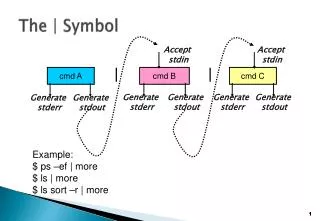
The | Symbol Accept stdin Accept stdin cmd A cmd B cmd C Generate stdout Generate stderr Generate stderr Generate stdout Generate stderr Generate stdout Example: $ ps –ef | more $ ls | more $ ls sort –r | more
wc (word count) Definition: Counts words, lines, and characters in a file. Syntax: wc[-lwc] [file. . ] Examples: $ wc /etc/passwd $ wc abcde fghijkl mnoqrstuvwxyz Ctrl-d ls> ls.out | wc -w Enter Enter Enter
head • The head command is used to display the first N lines of a given file Examples: $ head -2 file head [-n] [filename]
tail • The tail command is used to display the last N lines of a given file Examples: $ tail -10 file tail [-n] [filename]