
Uploaded by
casey
1 SLIDES
156 VIEWS
30LIKES
Guide to Accessing Student Email and Communication
DESCRIPTION
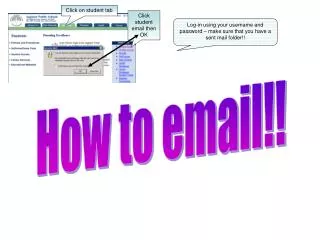
This guide provides step-by-step instructions for students on how to log into their email accounts. To start, click on the student tab and select the email option. Confirm the action by clicking OK, then log in using your username and password. It is crucial to check your sent mail folder for any outgoing emails. This ensures you effectively manage your communication and stay connected with peers and faculty. Follow these simple steps for a hassle-free email experience.
Download
1 / 1
Download Presentation 
Guide to Accessing Student Email and Communication
An Image/Link below is provided (as is) to download presentation
Download Policy: Content on the Website is provided to you AS IS for your information and personal use and may not be sold / licensed / shared on other websites without getting consent from its author.
Content is provided to you AS IS for your information and personal use only.
Download presentation by click this link.
While downloading, if for some reason you are not able to download a presentation, the publisher may have deleted the file from their server.
During download, if you can't get a presentation, the file might be deleted by the publisher.
E N D
Presentation Transcript
Click on student tab Click student email then OK Log-in using your username and password – make sure that you have a sent mail folder!! How to email!!




More Related