Comprehensive Overview of Computer Communication and Input/Output Devices
This document provides an in-depth exploration of various communication channels and input/output devices in computing. It covers memory, processors, internal and external storage, and devices like keyboards, mice, monitors, and printers. The role of software, including instructions for manual operations, is highlighted alongside networking solutions for seamless connectivity. Learn about cash registers, coprocessors, and data processing techniques that enable instantaneous access and infinite storage capacities. This overview serves as a foundational guide to understanding the hardware and software components that facilitate effective data management and communication.

Comprehensive Overview of Computer Communication and Input/Output Devices
E N D
Presentation Transcript
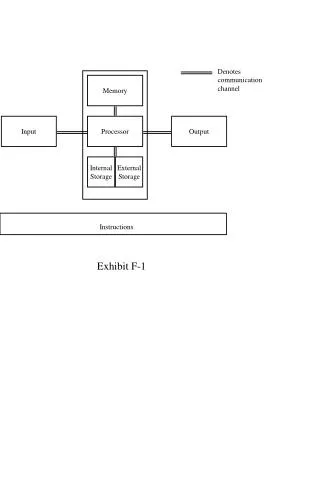
Denotes communication channel Memory Input Processor Output Internal Storage External Storage Instructions
Input/output box (input/output device) Calculator (Coprocessor) Clerk (Processor) Checkbook (Output device) File cabinet (External storage) Pens/pencils (Input/output devices) Accounts Payable Manual (Instructions) Desk (Memory)
Monitor and printer (Output devices) Network (Communication channels) Disk drives (Storage devices) Keyboard and mouse (Input devices) Software (Instructions) CPU (Processor)
Keyboard Monitor/pen device Cash register or Point-of-sale terminal Video camera Scanning device Fax/modem Microphone Mouse
Projection Monitor Printer Fax/modem Speaker
Track Byte } Sector Disk surface Disk
Seamless connectivity Intelligent software Instant access Instantaneous processing Infinite storage