Create Your Custom Facebook Cover Image: Step-by-Step Guide
60 likes | 183 Views
Transform your Facebook profile with a personalized cover image using this easy template. The blank slide provided is perfectly sized for Facebook, measuring 851 x 315 pixels. Customize your design by inserting pictures, shapes, and utilizing different fonts and background colors. Once you're satisfied with your creation, simply save it as a picture and upload it as your Facebook cover photo. Follow this guide to make your cover image stand out in your profile, ensuring it resonates with your unique style!


Create Your Custom Facebook Cover Image: Step-by-Step Guide
E N D
Presentation Transcript
How To Use This Template The blank slide below will be your canvas for creating your very own custom header image! The slide has already been sized to work with Facebook’s dimensions. To customize this slide, you can incorporate images by using “insert picture” or “insert shape” and produce your own graphics. Use different fonts, background colors, and effects to make your cover image stand out. Once you’re done, simply go to File Save as Picture. This will automatically save your slide as a picture, and you can upload it as your Facebook cover photo.
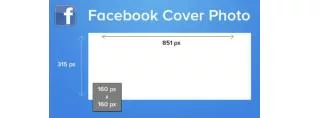
For Facebook, you’ll need an image that’s 851 x 315 pixels. 315 px Profile Photo Overlap 851 px
EXAMPLE Profile Photo Overlap
Delete this text box and the profile photo overlap guide and place your image/design here. Profile Photo Overlap
Like This Template? Share It! Click on the icons below to share this template.