Understanding Java Servlets and Networking Basics for Web Applications
This comprehensive guide introduces Java Servlets and their interaction with networking concepts, focusing on the client-server model. It explores Java networking capabilities through various packages, emphasizing socket-based communications and the importance of remote method invocation (RMI). The servlet API is dissected, detailing lifecycle methods and key interfaces such as HttpServletRequest and HttpServletResponse, essential for processing HTTP requests. Additionally, it covers serving HTML documents, data handling, and cookie management to enhance database-driven applications and streamline server-client interactions.

Understanding Java Servlets and Networking Basics for Web Applications
E N D
Presentation Transcript
Introduction • Networking • Massive, complex topic • Java networking in several packages • java.net • Socket based communications • View networking as streams of data • Reading/writing to socket like reading/writing to file • Packet based communications • Transmit packets of information. • Remote Method Invocation (RMI) • Objects in different Java Virtual Machines can communicate
Introduction • Client-server relationship • Client request action • Server performs action, responds to client • This view foundation of servlets • Highest-level view of networking • Servlet extends functionality of server • Useful for database-intensive applications • Thin clients - little client-side support needed • Server controls database access • Logic code written once, on server
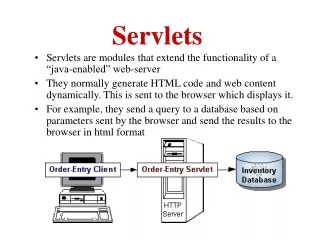
Overview of Servlet Technology • Servlets • Analog to applets • Execute on server's machine, supported by most web servers • Demonstrate communication via HTTP protocol • Client sends HTTP request • Server receives request, servlets process it • Results returned (HTML document, images, binary data)
The Servlet API • Servlet interface • Implemented by all servlets • Many methods invoked automatically by server • Similar to applets (paint, init, start, etc.) • abstract classes that implement Servlet • GenericServlet (javax.servlet) • HTTPServlet (javax.servlet.http) • Examples in chapter extend HTTPServlet • Methods • void init( ServletConfig config ) • Automatically called, argument provided
The Servlet API • Methods • ServletConfig getServletConfig() • Returns reference to object, gives access to config info • void service ( ServletRequest request, ServletResponse response ) • Key method in all servlets • Provide access to input and output streams • Read from and send to client • void destroy() • Cleanup method, called when servlet exiting
Life Cycle of Servlet init(ServletConfig); servlet HttpServlet GenericServlet doGet(HttpServletRequest, HttpServletResponse); service(ServletRequest, ServletResponse); doPost(HttpServletRequest, HttpServletResponse); ……. destroy();
HttpServlet Class • HttpServlet • Base class for web-based servlets • Overrides method service • Request methods: • GET - retrieve HTML documents or image • POST - send server data from HTML form • Methods doGet and doPost respond to GET and POST • Called by service • Receive HttpServletRequest and HttpServletResponse (return void) objects
HttpServletRequest Interface • HttpServletRequest interface • Object passed to doGet and doPost • Extends ServletRequest • Methods • String getParameter( String name ) • Returns value of parameter name (part of GET or POST) • Enumeration getParameterNames() • Returns names of parameters (POST) • String[] getParameterValues( String name ) • Returns array of strings containing values of a parameter • Cookie[] getCookies() • Returns array of Cookie objects, can be used to identify client
HttpServletResponse Interface • HttpServletResponse • Object passed to doGet and doPost • Extends ServletResponse • Methods • void addCookie( Cookie cookie ) • Add Cookie to header of response to client • ServletOutputStream getOutputStream() • Gets byte-based output stream, send binary data to client • PrintWriter getWriter() • Gets character-based output stream, send text to client • void setContentType( String type ) • Specify MIME type of the response (Multipurpose Internet Mail Extensions) • MIME type “text/html” indicates that response is HTML document. • Helps display data
Handling HTTP GET Requests • HTTP GET requests • Usually gets content of specified URL • Usually HTML document (web page) • Example servlet • Handles HTTP GET requests • User clicks Get Page button in HTML document • GET request sent to servlet HTTPGetServlet • Servlet dynamically creates HTML document displaying "Welcome to Servlets!"
3 import javax.servlet.*; 4 import javax.servlet.http.*; 7 public class HTTPGetServlet extends HttpServlet { 8 public void doGet( HttpServletRequest request, 9 HttpServletResponse response ) 10 throws ServletException, IOException Handling HTTP GET Requests • Use data types from javax.servlet and javax.servlet.http • HttpServlet has useful methods, inherit from it • Method doGet • Responds to GET requests • Default action: BAD_REQUEST error (file not found) • Override for custom GET processing • Arguments represent client request and server response
12 PrintWriter output; 14 response.setContentType( "text/html" ); // content type 15 output = response.getWriter(); // get writer Handling HTTP GET Requests • setContentType • Specify content • text/html for HTML documents • getWriter • Returns PrintWriter object, can send text to client • getOutputStream to send binary data (returns ServletOutputStream object)
19 buf.append( "<HTML><HEAD><TITLE>\n" ); 20 buf.append( "A Simple Servlet Example\n" ); 21 buf.append( "</TITLE></HEAD><BODY>\n" ); 22 buf.append( "<H1>Welcome to Servlets!</H1>\n" ); 23 buf.append( "</BODY></HTML>" ); 24 output.println( buf.toString() ); 25 output.close(); // close PrintWriter stream Handling HTTP GET Requests • Lines 19-23 create HTML document • println sends response to client • close terminates output stream • Flushes buffer, sends info to client
Handling HTTP GET Requests • Running servlets • Must be running on a server • Check documentation for how to install servlets • Tomcat web server • Apache Tomcat
Handling HTTP GET Requests • Port number • Where server waits for client (handshake point) • Client must specify proper port number • Integers 1 - 65535, 1024 and below usually reserved • Well-known port numbers • Web servers - port 80 default • JSDK/Apache Tomcat 4.0 Webserver- port 8080 • Change in default.cfg (server.port=8080)
1 <!-- Fig. 19.6: HTTPGetServlet.html --> 2 <HTML> 3 <HEAD> 4 <TITLE> 5 Servlet HTTP GET Example 6 </TITLE> 7 </HEAD> Handling HTTP GET Requests • HTML documents • Comments: <!-- text --> • Tags: <TAG> ... </TAG> • <HTML> ... <HTML> tags enclose document • <HEAD> ... </HEAD> - enclose header • Includes <TITLE> Title </TITLE> tags • Sets title of document
9 <FORM 10 ACTION="http://lab.cs.siu.edu:8080/rahimi/HTTPGetServlet" 11 METHOD="GET"> 12 <P>Click the button to have the servlet send 13 an HTML document</P> 14 <INPUT TYPE="submit" VALUE="Get HTML Document"> 15 </FORM> 16 </BODY> Handling HTTP GET Requests • Document body (<BODY> tags) • Has literal text and tags for formatting • Form (<FORM> tags ) • ACTION - server-side form handler • METHOD - request type
10 ACTION="http://localhost:8080/servlet/HTTPGetServlet" 14 <INPUT TYPE="submit" VALUE="Get HTML Document"> Handling HTTP GET Requests • ACTION • localhost - your computer • :8080 - port • /servlet - directory • GUI component • INPUT element • TYPE - "submit" (button) • VALUE - label • When pressed, performs ACTION • If parameters passed, separated by ? in URL
1 // Fig. 19.5: HTTPGetServlet.java 2 // Creating and sending a page to the client Import necessary classes and inherit methods from HttpServlet. 3import javax.servlet.*; 4 import javax.servlet.http.*; 5 import java.io.*; 6 7public class HTTPGetServlet extends HttpServlet { Create PrintWriter object. Create HTML file and send to client. 8 public void doGet( HttpServletRequest request, 9 HttpServletResponse response ) 10 throws ServletException, IOException 11 { 12 PrintWriter output; 13 14 response.setContentType( "text/html" ); // content type 15 output = response.getWriter(); // get writer 16 17 // create and send HTML page to client 18 StringBuffer buf = new StringBuffer(); 19 buf.append( "<HTML><HEAD><TITLE>\n" ); 20 buf.append( "A Simple Servlet Example\n" ); 21 buf.append( "</TITLE></HEAD><BODY>\n" ); 22 buf.append( "<H1>Welcome to Servlets!</H1>\n" ); 23 buf.append( "</BODY></HTML>" ); 24 output.println( buf.toString() ); 25 output.close(); // close PrintWriter stream 26 } 27 } 1. import 1.1 extends HttpServlet 2. doGet 2.1 setContentType 2.2 getWriter 2.3 println
1 <!-- Fig. 19.6: HTTPGetServlet.html --> 2 <HTML> 3 <HEAD> ACTION specifies form handler, METHOD specifies request type. 4 <TITLE> 5 Servlet HTTP GET Example 6 </TITLE> 7 </HEAD> Creates submit button, performs ACTION when clicked. 8 <BODY> 9 <FORM 10ACTION="http://lab.cs.siu.edu:8080/rahimi/HTTPGetServlet" 11 METHOD="GET"> 12 <P>Click the button to have the servlet send 13 an HTML document</P> 14 <INPUT TYPE="submit" VALUE="Get HTML Document"> 15 </FORM> 16 </BODY> 17 </HTML> HTML document 1. <TITLE> 2. <FORM> 2.1 ACTION 2.2 METHOD 3. INPUT TYPE
Handling HTTP POST Requests • HTTP POST • Used to post data to server-side form handler (i.e. surveys) • Both GET and POST can supply parameters • Example servlet • Survey • Store results in file on server • User selects radio button, presses Submit • Browser sends POST request to servlet • Servlet updates responses • Displays cumulative results
9 public class HTTPPostServlet extends HttpServlet { 10 private String animalNames[] = 11 { "dog", "cat", "bird", "snake", "none" }; 13 public void doPost( HttpServletRequest request, 14 HttpServletResponse response ) 15 throws ServletException, IOException Handling HTTP POST Requests • Extend HttpServlet • Handle GET and POST • Array for animal names • doPost • Responds to POST requests (default BAD_REQUEST) • Same arguments as doGet (client request, server response)
64 response.setContentType( "text/html" ); // content type 40 String value = 41 request.getParameter( "animal" ); 18 File f = new File( "survey.txt" ); 23 ObjectInputStream input = new ObjectInputStream( 24 new FileInputStream( f ) ); 26 animals = (int []) input.readObject(); Handling HTTP POST Requests • Open survey.txt, load animals array • Method getParameter( name ) • Returns value of parameter as a string • Content type
67 StringBuffer buf = new StringBuffer(); 68 buf.append( "<html>\n" ); 69 buf.append( "<title>Thank you!</title>\n" ); 70 buf.append( "Thank you for participating.\n" ); 71 buf.append( "<BR>Results:\n<PRE>" ); 73 DecimalFormat twoDigits = new DecimalFormat( "#0.00" ); 74 for ( int i = 0; i < percentages.length; ++i ) { 75 buf.append( "<BR>" ); 76 buf.append( animalNames[ i ] ); 88 responseOutput.println( buf.toString() ); Handling HTTP POST Requests • Return HTML document as before • <PRE> tag • Preformatted text, fixed-width • <BR> tag - line break
8 <FORM METHOD="POST" ACTION= 9 "http://lab.cs.siu.edu:8080/rahimi/HTTPPostServlet"> 10 What is your favorite pet?<BR><BR> 11 <INPUT TYPE=radio NAME=animal VALUE=dog>Dog<BR> 12 <INPUT TYPE=radio NAME=animal VALUE=cat>Cat<BR> 13 <INPUT TYPE=radio NAME=animal VALUE=bird>Bird<BR> 14 <INPUT TYPE=radio NAME=animal VALUE=snake>Snake<BR> 15 <INPUT TYPE=radio NAME=animal VALUE=none CHECKED>None 16 <BR><BR><INPUT TYPE=submit VALUE="Submit"> 17 <INPUT TYPE=reset> 18 </FORM> Handling HTTP POST Requests • METHOD="POST" • Radio buttons (only one may be selected) • TYPE - radio • NAME - parameter name • VALUE - parameter value • CHECKED - initially selected
8 <FORM METHOD="POST" ACTION= 9 "http://lab.cs.siu.edu:8080/rahimi/HTTPPostServlet"> 10 What is your favorite pet?<BR><BR> 11 <INPUT TYPE=radio NAME=animal VALUE=dog>Dog<BR> 12 <INPUT TYPE=radio NAME=animal VALUE=cat>Cat<BR> 13 <INPUT TYPE=radio NAME=animal VALUE=bird>Bird<BR> 14 <INPUT TYPE=radio NAME=animal VALUE=snake>Snake<BR> 15 <INPUT TYPE=radio NAME=animal VALUE=none CHECKED>None 16 <BR><BR><INPUT TYPE=submit VALUE="Submit"> 17 <INPUT TYPE=reset> 18 </FORM> Handling HTTP POST Requests • Submit button (executes ACTION) • Reset button - browser resets form, with None selected
1 // Fig. 19.7: HTTPPostServlet.java 2 // A simple survey servlet Extending HttpServlet allows processing of GET and POST requests. 3 import javax.servlet.*; 4 import javax.servlet.http.*; 5 import java.text.*; 6 import java.io.*; 7 import java.util.*; 8 9public class HTTPPostServlet extends HttpServlet { 10 private String animalNames[] = 11 { "dog", "cat", "bird", "snake", "none" }; 12 13 public void doPost( HttpServletRequest request, 14 HttpServletResponse response ) 15 throws ServletException, IOException 16 { 17 int animals[] = null, total = 0; 18 File f = new File( "survey.txt" ); 19 20 if ( f.exists() ) { 21 // Determine # of survey responses so far 22 try { 23 ObjectInputStream input = new ObjectInputStream( 24 new FileInputStream( f ) ); 25 26 animals = (int []) input.readObject(); 27 input.close(); // close stream 28 29 for ( int i = 0; i < animals.length; ++i ) 30 total += animals[ i ]; 31 } 1. import 1.1 extendsHttpServlet 1.2 animalNames 2. doPost 2.1 Open file
32 catch( ClassNotFoundException cnfe ) { 33 cnfe.printStackTrace(); Use request (HttpServletRequest) method getParameter to get value of animal. 34 } 35 } 36 else 37 animals = new int[ 5 ]; 38 39 // read current survey response 40 String value = 41 request.getParameter( "animal" ); 42 ++total; // update total of all responses 43 44 // determine which was selected and update its total 45 for ( int i = 0; i < animalNames.length; ++i ) 46 if ( value.equals( animalNames[ i ] ) ) 47 ++animals[ i ]; 48 49 // write updated totals out to disk 50 ObjectOutputStream output = new ObjectOutputStream( 51 new FileOutputStream( f ) ); 52 53 output.writeObject( animals ); 54 output.flush(); 55 output.close(); 56 57 // Calculate percentages 58 double percentages[] = new double[ animals.length ]; 59 60 for ( int i = 0; i < percentages.length; ++i ) 61 percentages[ i ] = 100.0 * animals[ i ] / total; 62 2.2 getParameter 2.3 Write to file
63 // send a thank you message to client 64 response.setContentType( "text/html" ); // content type 65 66 PrintWriter responseOutput = response.getWriter(); 67 StringBuffer buf = new StringBuffer(); 68 buf.append( "<html>\n" ); 69 buf.append( "<title>Thank you!</title>\n" ); 70 buf.append( "Thank you for participating.\n" ); 71 buf.append( "<BR>Results:\n<PRE>" ); 72 73 DecimalFormat twoDigits = new DecimalFormat( "#0.00" ); 74 for ( int i = 0; i < percentages.length; ++i ) { 75 buf.append( "<BR>" ); 76 buf.append( animalNames[ i ] ); 77 buf.append( ": " ); 78 buf.append( twoDigits.format( percentages[ i ] ) ); 79 buf.append( "% responses: " ); 80 buf.append( animals[ i ] ); 81 buf.append( "\n" ); 82 } 83 84 buf.append( "\n<BR><BR>Total responses: " ); 85 buf.append( total ); 86 buf.append( "</PRE>\n</html>" ); 87 88 responseOutput.println( buf.toString() ); 89 responseOutput.close(); 90 } 91 } 2.4 getWriter 2.5 Create HTML code 2.6 println
1 <!-- Fig. 19.8: HTTPPostServlet.html --> 2 <HTML> Use a POST request type. 3 <HEAD> 4 <TITLE>Servlet HTTP Post Example</TITLE> 5 </HEAD> 6 7 <BODY> 8 <FORM METHOD="POST" ACTION= Create radio buttons. Specify parameter name and value. None is initially selected (CHECKED). 9 "http://lab.cs.siu.edu:8080/rahimi/HTTPPostServlet"> Returns form to original state (None selected). 10 What is your favorite pet?<BR><BR> 11 <INPUT TYPE=radio NAME=animal VALUE=dog>Dog<BR> 12 <INPUT TYPE=radio NAME=animal VALUE=cat>Cat<BR> 13 <INPUT TYPE=radio NAME=animal VALUE=bird>Bird<BR> 14 <INPUT TYPE=radio NAME=animal VALUE=snake>Snake<BR> 15 <INPUT TYPE=radio NAME=animal VALUE=none CHECKED>None 16 <BR><BR><INPUT TYPE=submit VALUE="Submit"> 17 <INPUT TYPE=reset> 18 </FORM> 19 </BODY> 20 </HTML> HTML file 1. <FORM> 1.1 METHOD="POST" 2. <INPUT>
Session Tracking • Web sites • Many have custom web pages/functionality • Custom home pages - http://my.yahoo.com/ • Shopping carts • Marketing • HTTP protocol does not support persistent information • Cannot distinguish clients • Distinguishing clients • Cookies • Session Tracking
Cookies • Cookies • Small files that store information on client's computer • Servlet can check previous cookies for information • Header • In every HTTP client-server interaction • Contains information about request (GET or POST) and cookies stored on client machine • Response header includes cookies servers wants to store • Age • Cookies have a lifespan • Can set maximum age • Cookies can expire and are deleted
Cookies • Example • Demonstrate cookies • Servlet handles both POST and GET requests • User selects programming language (radio buttons) • POST - Add cookie containing language, return HTML page • GET - Browser sends cookies to servlet • Servlet returns HTML document with recommended books • Two separate HTML files • One invokes POST, the other GET • Same ACTION - invoke same servlet
14 public void doPost( HttpServletRequest request, 15 HttpServletResponse response ) 19 String language = request.getParameter( "lang" ); 21 Cookie c = new Cookie( language, getISBN( language ) ); 22 c.setMaxAge( 120 ); // seconds until cookie removed Cookies • Method doPost • Get language selection • Cookie constructor • Cookie ( name, value ) • getISBN is utility method • setMaxAge( seconds ) - deleted when expire
41 public void doGet( HttpServletRequest request, 42 HttpServletResponse response ) 46 Cookie cookies[]; 48 cookies = request.getCookies(); // get client's cookies 23 response.addCookie( c ); // must precede getWriter Cookies • Add cookie to client response • Part of HTTP header, must come first • Then HTML document sent to client • Method doGet • getCookies • Returns array of Cookies
57 if ( cookies != null ) { 62 output.println( 63 cookies[ i ].getName() + " How to Program. " + 64 "ISBN#: " + cookies[ i ].getValue() + "<BR>" ); Cookies • Cookie methods • getName, getValue • Used to determine recommended book • If cookie has expired, does not execute
1 // Fig. 19.9: CookieExample.java Allows class to handle GET and POST. 2 // Using cookies. 3 import javax.servlet.*; 4 import javax.servlet.http.*; 5 import java.io.*; 6 Create a new Cookie, initialized with language parameter. 7public class CookieExample extends HttpServlet { 8 private String names[] = { "C", "C++", "Java", 9 "Visual Basic 6" }; 10 private String isbn[] = { Set maximum age of cookie, add to header. 11 "0-13-226119-7", "0-13-528910-6", 12 "0-13-012507-5", "0-13-528910-6" }; 13 14 public void doPost( HttpServletRequest request, 15 HttpServletResponse response ) 16 throws ServletException, IOException 17 { 18 PrintWriter output; 19 String language = request.getParameter( "lang" ); 20 21 Cookie c = new Cookie( language, getISBN( language ) ); 22 c.setMaxAge( 120 ); // seconds until cookie removed 23 response.addCookie( c ); // must precede getWriter 24 25 response.setContentType( "text/html" ); 26 output = response.getWriter(); 27 1. import 1.1 extendsHttpServlet 2. doPost 2.1 getParameter 2.2 Cookie 2.3 setMaxAge 2.4 addCookie
28 // send HTML page to client 29 output.println( "<HTML><HEAD><TITLE>" ); 30 output.println( "Cookies" ); 31 output.println( "</TITLE></HEAD><BODY>" ); 32 output.println( "<P>Welcome to Cookies!<BR>" ); 33 output.println( "<P>" ); 34 output.println( language ); Returns array of Cookies. 35 output.println( " is a great language." ); 36 output.println( "</BODY></HTML>" ); 37 38 output.close(); // close stream 39 } 40 41 public void doGet( HttpServletRequest request, 42 HttpServletResponse response ) 43 throws ServletException, IOException 44 { 45 PrintWriter output; 46 Cookie cookies[]; 47 48 cookies = request.getCookies(); // get client's cookies 49 50 response.setContentType( "text/html" ); 51 output = response.getWriter(); 52 53 output.println( "<HTML><HEAD><TITLE>" ); 54 output.println( "Cookies II" ); 55 output.println( "</TITLE></HEAD><BODY>" ); 56 3. doGet 3.1 getCookies
57 if ( cookies != null ) { 58 output.println( "<H1>Recommendations</H1>" ); 59 60 // get the name of each cookie 61 for ( int i = 0; i < cookies.length; i++ ) Use cookies to determine recommended book and ISBN. 62 output.println( 63 cookies[ i ].getName() + " How to Program. " + If cookies have expired, no recommendations. 64 "ISBN#: " + cookies[ i ].getValue() + "<BR>" ); 65 } 66 else { 67 output.println( "<H1>No Recommendations</H1>" ); 68 output.println( "You did not select a language or" ); 69 output.println( "the cookies have expired." ); 70 } 71 72 output.println( "</BODY></HTML>" ); 73 output.close(); // close stream 74 } 75 76 private String getISBN( String lang ) 77 { 78 for ( int i = 0; i < names.length; ++i ) 79 if ( lang.equals( names[ i ] ) ) 80 return isbn[ i ]; 81 82 return ""; // no matching string found 83 } 84 } 3.2 getName, getValue 4. Method getISBN
1 <!-- Fig. 19.10: SelectLanguage.html --> 2 <HTML> 3 <HEAD> 4 <TITLE>Cookies</TITLE> 5 </HEAD> 6 <BODY> 7 <FORM ACTION="http://lab.cs.siu.edu:8080/rahimi/CookieExample" 8 METHOD="POST"> 9 <STRONG>Select a programming language:<br> 10 </STRONG><BR> 11 <PRE> 12 <INPUT TYPE="radio" NAME="lang" VALUE="C">C<BR> 13 <INPUT TYPE="radio" NAME="lang" VALUE="C++">C++<BR> 14 <INPUT TYPE="radio" NAME="lang" VALUE="Java" 15 CHECKED>Java<BR> 16 <INPUT TYPE="radio" NAME="lang" 17 VALUE="Visual Basic 6">Visual Basic 6 18 </PRE> 19 <INPUT TYPE="submit" VALUE="Submit"> 20 <INPUT TYPE="reset"> </P> 21 </FORM> 22 </BODY> 23 </HTML> HTML file 1. POST 2. Radio buttons
1 <!-- Fig. 19.11: BookRecommendation.html --> 2 <HTML> 3 <HEAD> 4 <TITLE>Cookies</TITLE> 5 </HEAD> 6 <BODY> 7 <FORM ACTION="http://lab.cs.siu.edu:8080/rahimi/CookieExample" 8 METHOD="GET"> 9 Press "Recommend books" for a list of books. 10 <INPUT TYPE=submit VALUE="Recommend books"> 11 </FORM> 12 </BODY> 13 </HTML> HTML file 1. GET 2. Submit
23 HttpSession session = request.getSession( true ); Session Tracking with HttpSession • HttpSession (javax.servlet.http) • Alternative to cookies • Data available until browsing ends • Methods • Creation • getSession( createNew ) • Class HttpServletRequest • Returns client's previous HttpSession object • createNew - if true, creates new HttpSession object if does not exist
58 valueNames = session.getValueNames(); 73 for ( int i = 0; i < valueNames.length; i++ ) { 74 String value = 75 (String) session.getValue( valueNames[ i ] ); 26 session.putValue( language, getISBN( language ) ); Session Tracking with HttpSession • putvalue( name, value ) • Adds a name/value pair to object • getValueNames() • Returns array of Strings with names • getValue( name ) • Returns value of name as an Object • Cast to proper type