How to Register and Access Your Florida Blue Member Account
Get started with your Florida Blue Member Account by visiting floridablue.com. Follow simple steps to register: enter your Member Number from your ID card, create a user account, and confirm your email. If you forget your User ID or password, retrieve it easily by following the prompts on the website. Once registered, you can log in anytime to access personalized benefits, health information, and BlueRewards. Enjoy the convenience of managing your health coverage and rewards at your fingertips!

How to Register and Access Your Florida Blue Member Account
E N D
Presentation Transcript
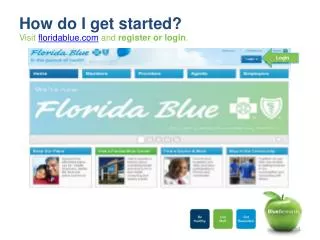
How do I get started? Visit floridablue.com and register or login. Login
Member Website: Create Your Member Account Step 1. Click on Register Now. You’ll need your Member Number (located on your Member ID card) and a valid email address. Click on Register
Fill in all of the boxes. Click Continue Member Website: Create Your Member Account Cont’d Step 2. Enter your information in each box and click Continue
Click on confirm your email address to finish registering Member Website: Create Your Member Account Cont’d Step 3. Look for an email from us and click the link within the email to go on to Member Website and confirm your identity. Don’t see it? Check your spam or junk mail. Now that you’ve created your account simply enter your new User ID and PIN on www.floridablue.com to see your benefit information and more! You now have access to personalized benefits and health information any time, day or night!
Member Website: Forgot your User ID and/or Password?4 Easy Steps Step 1: Go to www.floridablue.com. Click on the link Forgot your User ID and/or Password Forgot your User ID and/or Password
Member Website: Forgot your User ID and/or Password? 4 Easy Steps Step 2: Select what you have forgotten: User ID, Password, or Both Select what you have forgotten
Member Website: Forgot your User ID and/or Password? 4 Easy Steps Step 3: Enter your information in each box and click Continue Fill in all of the boxes. Click Continue
Member Website: Forgot your User ID and/or Password? 4 Easy Steps Step 4. Your User ID will appear on the screen and/or you will be prompted to create a new password. Click Continue
Member Website: Accessing Your Member Account Enter Credentials You have registered for you account at www.floridablue.com. Select login and enter your credentials
Member Account: Accessing BlueRewards Discount & Rewards To access your Blue Rewards homepage select Health & Wellness and then select the link Discount & Rewards
Member Account: Accessing Blue Rewards Click on the Earn BlueRewards Box to continue to the rewards lobby homepage.