Download
1 / 14
0 likes | 0 Views
As businesses grow, managing quality through disconnected systems becomes increasingly challenging. This PDF focuses on how QMS quality management systems help centralize quality processes and improve accountability. Learn how eQMS software simplifies documentation, audits, and corrective actions while supporting data-driven quality decisions. The guide also outlines why organizations consider cloud-based QMS software among the best quality management software options for improving transparency and control across quality operations.

E N D
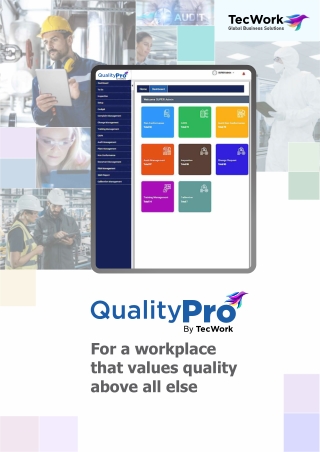
By TecWork Pro By TecWork Pro For a workplace that values quality above all else
By TecWork Pro Today businesses have no choice but to put Quality at the forefront. The ever-stringent regulations are forcing manufacturers to make quality a company-wide approach and not just restrict it to the quality department. Moreover, rising awareness has made consumers more inclined towards quality products. This is pushing companies to maintain a strong level of visibility and control over their quality management system which is not easy with paper-based or manual systems. QualityPro quality methodologies and advanced user workflow to help companies manage and track Quality Management Systems. With eight integrated modules for quality and compliance management, QualityPro QMS lifts the businesses into a collaborative and paperless environment for continual improvement, while reducing the total administrative cost of maintaining quality at every stage. Quality Management Software (QMS) solution offers built-in Available as a standalone QMS solution, QualityPro's modules are completely integrated, allowing swift movement of data from one module to another, launching corrective actions directly from complaints/adverse events, and tracing plus tracking data from source to event and back. This way, an audit trail of the complete event is created and stored for future reference. QMS Cockpit Inspection Management 11 11 10 10 Document Management Calibration Management Different Components of QualityPro QMS Risk NC/CAPA Management Complaint Management Audit Management Training Management SOP Change Management
By TecWork Pro Document Management QualityPro's feature-rich module that stores, creates, tracks, retrieves, and manages all types of documents. It encompasses the entire document lifecycle within an organization- from the creation and publication of content, to archival and finally the retention or disposal of content in a much secure way. Automating manual document control with sign-off and change control, it improves efficiency while meeting compliance requirements. Categorizing documents, maintaining versions and change logs, the system catalyzes audits and makes meeting compliance much easier. Document Management is a Key Features l Acts as a central library to store all the documents together l Maintains the audit trail of who has viewed a document, when it was accessed, and how it may have been modified l Numbers or indexes documents via meta- data with different “search” terms l Organizes and segregates documents into different categories like: policies, applications, etc. l Displays the current stage of document lifecycle: Draft, Pending for Approval, Approved, Active, Obsolete and Inactive l Secures the document through a selective restriction of access l Generates an alert for the specified electronic distribution list that the document has been released l Keeps a track of all versions of a document, and lets you see what has changed, who did it and when the change was made l Allows multiple people to work and edit the same document in a synchronized way without altering each other's work and maintain different versions of it By TecWork Pro
By TecWork Pro NC/CAPA Management QualityPro QMS seamlessly combines Non-Conformance (NC) and Corrective and Preventive Action (CAPA) into a single module for efficient issue resolution. When a quality problem surfaces, it allows for rapid classification, assigning responsibility, and immediate corrective actions. Users can upload evidence and document decisions, streamlining the NC process and automating record-keeping while ensuring full compliance with standards like FDA requirements. Key Features l Creates, updates and manages non- conformance across SO Delivery, PO Receipt, Production, QC, Inspection, or other types of records l Automatically launches NC records on Quality or inspection failure l Performs in-depth root cause analysis l Records all the activities undertaken to resolve the nonconformity l Maintains and tracks nonconformity records l Quickly associates existing CAPA instances l Stamps all records with user, date, and time l Simplifies the CAPA process, including document maintenance and approvals, reducing cycle time l Classifies CAPA processes based on their characteristics l Actively reviews and implements actions for improvement l Associates the appropriate reason for CAPA l Records corrective measures taken to prevent the recurrence of non-conformance l Performs verification and maintains the effectiveness of CAPA or any other vital information related to the CAPA verification process l Allows attaching supporting documents A robust CAPA process is essential for ISO, GMP, and overall quality compliance. QualityPro QMS acts as the central hub for comprehensive product and operation improvement, tracking CAPA's impact over time. It promotes a risk- based, compliance-driven approach to address root issues and prevent recurrence, fostering a culture of continuous improvement within organizations. By TecWork Pro
By TecWork Pro Complaint Management QualityPro QMS the entire complaint resolution process. Right from maintaining to investigating the complaint, then communicating the resolution back to the customer and finally closing the issue – all can be performed in one easy-to-use environment. This helps ensure industry and regulatory compliance, improve product quality, and reduce fines and costs associated with customer complaints and resulting recalls. Complaint Module streamlines Key Features l Efficiently handles, tracks, resolves, and closes complaints from various sources l Offers a dashboard for a snapshot view of customer relationships and visual analysis of complaints l Captures key transaction details and complaint specifics l Employs a comprehensive workflow for effective complaint resolution l Manages complaints by assigning them to a group or an individual l Categorizes complaints by severity for prioritized resolution l Enhances detail by attaching supporting documents or screenshots l Documents investigation details, action plans, and notifications By TecWork Pro By TecWork Pro
By TecWork Pro Training Management To ensure employees are adequately trained, QualityPro's Training Management Module manages the training process and tracks training records, keeping them up to date and compliant with your quality system. It helps analyze current or future training needs and costs. Key Features l Defines courses based on job profiles, skills, or business needs with expiration dates l Gathers requirements based on skill needs, raised requests, or incorporated changes l Uses the Training Scheduling Dashboard to maintain employee training needs, schedule sessions, and update batch statuses efficiently l Creates, manages, conducts, and tracks training batches, and assigns trainers or guest trainers l Associates different tests or evaluation methods with weightage l Generates certifications based on evaluations l Displays training-related information about employees and their training status using the MIS Dashboard l Easily finds and matches qualified employees within your organization to the right job, saving valuable time l Utilizes the Job-Profile Matrix to display employee training status by Job Code, indicating course completion percentage QualityPro's Training management module automates and streamlines paper-based training systems, increasing efficiency by automating all training tasks from scheduling to completion. It reduces training staff workload by automating routine tasks, tracks and addresses training gaps, enhances audit readiness, and makes competency evaluation more efficient. In a nutshell, QualityPro's Training management module enables businesses to organize and schedule training, manage certifications, develop training curriculums, define evaluation methods, and store results, records, and history—all in one platform. By TecWork Pro
By TecWork Pro Change Management QualityPro's allows companies to establish a proper workflow for documenting changes. It helps automate and manage every step of the change control process- from initiating change requests, through impact evaluation, actual implementation, verification, approval to closure. Additionally, the system offers a way to set-up department-wise approvals, besides providing real-time notifications and validations for approvals, change executions, implementations, closure, and training. This helps businesses meet FDA and Quality System requirements thereby enabling achieve change management objectives seamlessly. Change Management Module Key Features l Supports the entire change management cycle: creation, impact evaluation, implementation, verification, approval, closure, and training l Maintains, tracks, and approves changes l Defines description, purpose, affected department, and implementation plan for changes l Includes default change types to prevent redundant data entry l Defines priority, nature, CAPA, and source of changes By TecWork Pro
By TecWork Pro SOP Management The feature of QualityPro QMS offers an efficient solution for creating standardized SOP documents. With this feature, users can easily create SOP documents and share them with team members. Roles can be assigned, and supporting documents can be attached as needed. Team members can then execute the assigned SOPs and submit their records for verification. Administrators have the ability to review and verify the status of submitted SOP records, create additional SOP templates, and generate SOPs accordingly. Standard Operating Procedures (SOP) Key Features l Efficiently creates standardized SOP documents l Maintains SOPs, policies, and other critical documents at one place l Easily shares SOP documents with team members l Assigns roles and attaches supporting documents l Executes and submits SOP records by team members l Reviews and verifies submitted SOP records by administrators l Creates additional SOP templates l Generates SOPs based on verified records l Provides a historical record of SOPs l Details the 'how,' 'why,' and 'when' of each step in existing processes l Associates related guidelines and formats l Easily accesses SOPs and policies relevant to a specific job with just a single click This meticulous approach ensures compliance with both company and government regulations, serving as a valuable checklist for auditors and streamlining the auditing process. QualityPro's Advanced SOP feature also provides a historical record of SOPs, detailing the 'how,' 'why,' and 'when' of each step in an existing process. This comprehensive documentation saves valuable time and resources, ensuring that your business maintains quality control, follows consistent documented practices, and delivers products of the same high quality and specifications with each operation. By TecWork Pro
By TecWork Pro Audit Management QualityPro's organizations deal with the everyday challenges they face while conducting their audit operations. These operational challenges the organizations face become trickier, when we add adherence to particular regulations to the mix. Such regulations can sometimes be difficult to follow, and some employees tend to ignore/break them when put under the pressure of a heavy workload. Audit Management Module helps Key Features l Offers comprehensive structure for seamless audit planning and management l Provides organized checklists and templates for various audit types l Manages planned, ad-hoc, internal, external, and statutory audits effectively l Employs audit scheduling dashboard for effortless audit scheduling But QualityPro's audit management module provides data to business and quality leaders by automating the audit procedure, allowing them to identify gaps and estimate future quality performance. It also provides them with access to prior audit documents and reports, enabling them to spot trends in failure and take corrective and preventive action to improve business. As a result, businesses ensure that their operations are always in compliance with the law. l Uses audit management dashboard for closing audits, initiating approval workflows, etc. l Generates NC records for any discovered non- conformances l Performs root cause analysis, CAPA, and follow-up audits to ensure effectiveness l Generates detailed reports for audit checklists, checklist templates, and audit plans By TecWork Pro
By TecWork Pro Risk Management QualityPro's organizations identify risks, define their types & severity, assess them, plan controls, define risk incidents and tasks, action plans, and even make them go through an internal approval process if the case may. Through this functionality, QualityPro offers businesses the requisite flexibility & configurability to adapt to their specific process requirements. With it, businesses can define and assess a risk as inherent or residual, reassess it, define controls, and take relevant actions to successfully mitigate it, while ensuring flawless business performance, and matching desired quality standards. Risk Management Module helps Key Features l Ensures proficient risk identification & reporting l Facilitates easy & quick risk categorization l Ensures easy assessment of risk type & impact l Manages and monitors tasks effectively l Provides risk heat map for better understanding l Improves data visualization & interpretation l Assures compliance with industry standards l Reduces operational costs l Focuses on critical problems and opportunities By TecWork Pro
By TecWork Pro Calibration Management Precision and accuracy are critical in manufacturing, especially when it comes to quality assurance. QualityPro’s Calibration Management System empowers manufacturers to systematically track, schedule, and manage the calibration of instruments and equipment. By digitizing the entire process, it eliminates manual errors, ensures timely calibrations, and helps maintain consistent product quality across the production lifecycle. Key Features lCentralized Instrument Database: Manage calibration data, history, and schedules in one unified system. lAutomated Calibration Scheduling: Set up recurring calibration tasks and receive timely reminders to avoid delays. lTraceability & Compliance: Maintain complete records for audits and meet regulatory requirements like ISO, FDA, etc. lCertificate Management: Generate and store calibration certificates for quick access. lStatus Tracking & Alerts: Get real-time visibility into calibration status — due, overdue, or completed. lUser Roles & Permissions: Control access with configurable roles for calibration engineers, quality heads, and operators. lIntegration Ready: Seamlessly integrates with other QualityPro modules for a holistic quality ecosystem. The system maintains a centralized repository of all calibration-related data, including equipment details, calibration histories, certificates, due dates, and responsible personnel. With automated scheduling and proactive alerts, you never miss a calibration deadline, thereby reducing the risk of non- compliance or machine inaccuracies. Whether you're managing a handful of tools or thousands of critical instruments, the system scales effortlessly to fit your needs. In addition to operational efficiency, QualityPro supports regulatory compliance by maintaining full traceability and audit readiness. It aligns with industry standards such as ISO, FDA, and GMP, making it easier to demonstrate calibration control during inspections. The result? Better decision-making, reduced downtime, and a higher level of confidence in the accuracy and reliability of your equipment.
By TecWork Pro Inspection Management Consistent product quality starts with effective inspection controls. QualityPro’s Inspection Management System enables manufacturers to streamline, standardize, and automate their inspection processes—right from raw material intake to in-process checks and finished goods evaluation. By digitizing inspection data capture and evaluation, the system ensures defects are detected early, reducing rework, scrap, and customer complaints. Key Features lMulti-Stage Inspection Support: Manage inspections at goods receipt, in-process, and final stages. lConfigurable Inspection Plans: Define parameters based on item, process, vendor, or customer-specific needs. lReal-Time Non-Conformance Alerts: Flag issues immediately with deviation handling and corrective actions. lData Capture & Analysis: Digitally record inspection results (as numeric/alpha- numeric/pass-fail) and analyze trends for proactive quality control. lIntegration with QualityPro Modules: Link inspection data with calibration, document control, and complaint management. lAudit Readiness: Ensure inspection records are complete, organized, and ready for regulatory or customer audits. lRole-Based Access Control: Secure, permission-driven access for inspectors, supervisors, and quality managers. With powerful configuration capabilities, the system supports a wide range of inspections—visual, dimensional, functional, or attribute-based—tailored to your product and process needs. Inspection plans can be defined based on item, vendor, batch, or customer- specific requirements, ensuring compliance with internal quality standards and external regulations. Real-time alerts and deviation tracking empower quality teams to respond quickly, contain issues, and prevent recurrence. Integrated tightly with other modules of QualityPro, the Inspection Management System enables complete traceability, centralized data access, and robust analytics. It not only simplifies audits but also provides insights to drive continuous improvement in quality processes. The result is higher product consistency, enhanced customer satisfaction, and a stronger reputation in the market.
By TecWork Pro QMS Cockpit The QMS Cockpit is a centralized but personalized interactive workplace that streamlines cross-functional quality processes and enables robust reporting and analytics capabilities. With a look and feel of a dashboard, the cockpit is sectionized to show activities and data from various QMS modules. The easy-to- use platform includes all activities including viewing, cancelling, approving and rejecting approvals, releasing documents, along with providing visibility into records, SOPS, Policies, etc. It makes you more lean and efficient by broadcasting all information or say policies together to everyone in your organization. Key Features l Personalizes the dashboard for harmonization and collaboration l Provides distinct sections for various QMS modules l Displays activities pending for the user l Enables bulk selection and release of documents l Allows viewing of pending change requests and marking them as 'Task Completed’ l Enables viewing and verifying completed change requests l Supports selection of multiple or all change requests with a single click By TecWork Pro
By TecWork Pro About TecWork TecWork Global Business Solutions is a startup, where cutting-edge technology converges with business excellence. We are dedicated to empowering businesses through innovative solutions that specialize in and seamlessly align with diverse business objectives like Quality Management Software Fleet Management Software Field , Force Management Software Human Resource Management Software , etc. , , Our mission is to elevate operational efficiency, ensure compliance, and drive success across a spectrum of industries. With a passion to innovate, commitment to excellence, and a hunger for technological advancement, we are your strategic partner in excelling in the modern business landscape. Join us on the journey to optimize, streamline, and transform your business processes with our state-of-the-art tools. Global Business Solutions ST-2, Ground Floor, Brilliant Solitaire, Plot No. 6A, Scheme 78, Part-II, Indore - 452010 India I www.tecwrk.com sales@tecwrk.com ©2025 TecWork Global Solutions Pvt. Ltd, All Rights Reserved.