Download
1 / 7
0 likes | 3 Views
Confused between PCAP and resistive touch screens? Learn which is best for your environment in this detailed comparison by Butler Technologies u2014 Read the full blog here: https://butler-technologies.gitbook.io/pcap-vs-resistive-touch-screen-which-is-right-for-your-application/

E N D
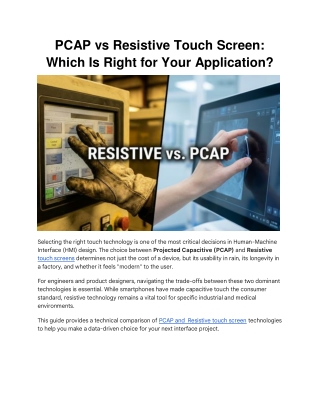
PCAP vs Resistive Touch Screen: Which Is Right for Your Application? Selecting the right touch technology is one of the most critical decisions in Human-Machine Interface (HMI) design. The choice between Projected Capacitive (PCAP) and Resistive touch screens determines not just the cost of a device, but its usability in rain, its longevity in a factory, and whether it feels "modern" to the user. For engineers and product designers, navigating the trade-offs between these two dominant technologies is essential. While smartphones have made capacitive touch the consumer standard, resistive technology remains a vital tool for specific industrial and medical environments. This guide provides a technical comparison of PCAP and Resistive touch screen technologies to help you make a data-driven choice for your next interface project.
1. Resistive Touch Screens: The Rugged Workhorse Resistive technology is the veteran of the touch screen world. Despite the ubiquity of glass touchscreens in consumer electronics, resistive screens remain the dominant choice for mission-critical industrial and military applications due to their reliability and input flexibility. How It Works (Pressure-Based) A resistive screen consists of two flexible layers (usually ITO-coated PET and glass) separated by microscopic spacer dots. When you press the screen, the top layer flexes and touches the bottom layer, completing a voltage divider circuit. The controller calculates the X and Y coordinates based on the voltage drop. Key Engineering Advantages ●Universal Input: Because it relies on pressure, it works with anything: a bare finger, a heavy leather glove, a stylus, or even the edge of a credit card. ●EMI Immunity: Resistive screens are passive components. They do not emit significant electromagnetic interference (EMI) and are largely immune to external electrical noise, making them ideal for sensitive aerospace or medical environments. ●Contaminant Proof: Since the actuation is mechanical, surface contaminants like oil, grease, or water droplets do not cause false touches.
Limitations ●Single Touch: Standard resistive screens generally support only single-point touch (no pinch-to-zoom). ●Optical Clarity: The multiple layers and air gap reduce light transmission (typically 75- 80%), which can make the display look slightly dimmer or less sharp. ●Surface Wear: The top layer is a flexible plastic (PET) that can be scratched or gouged by sharp objects over time.
2. Projected Capacitive (PCAP) Touch Screens: The Modern Standard PCAP technology is what most users expect today because it mimics the interface of a smartphone. It offers a sleek, glass-fronted aesthetic with high responsiveness. How It Works (Electrical Coupling) PCAP screens use a grid of transparent electrodes (usually ITO) to create an electrostatic field. When a conductive object (like a finger) approaches the glass surface, it distorts the field. The controller measures this change in capacitance to pinpoint the touch. Key Engineering Advantages ●Multi-Touch & Gestures: PCAP supports multi-touch (10+ points), enabling gestures like pinch, zoom, swipe, and rotate. ●Durability & Aesthetics: The front surface is typically chemically strengthened glass (like Gorilla Glass). It is highly resistant to scratches (Mohs hardness 6-7) and cleaning chemicals. ●Optical Clarity: With no air gaps—especially when optically bonded—PCAP offers superior light transmission (>90%) and visibility. Limitations (and Solutions) ●Water Sensitivity: Because water is conductive, rain or saline spills can register as "false touches" on a standard PCAP screen. However, advanced firmware tuning can mitigate this by rejecting water droplets. ●Glove Issues: Thick gloves act as insulators, blocking the electrical signal. This can often be solved by increasing the sensitivity of the sensor or requiring specialized conductive gloves. 3. Comparison Matrix: At a Glance For engineers, the choice often comes down to this direct comparison of specifications.
4. Selecting Based on Application When to Choose Resistive ●Heavy Industry: If the operator wears thick welding or safety gloves that would block a capacitive signal. ●High EMI Environments: If the device operates near massive generators or unshielded electronics, where electrical noise could confuse a PCAP sensor. ●Cost-Sensitive Projects: For simple button-replacement interfaces where gestures aren't needed. ●Extreme Contamination: If the screen will be covered in mud, oil, or conductive fluids. When to Choose PCAP
●Medical Devices: For easy wipe-down sterilization (smooth glass front) and high- resolution imaging displays. ●Public Kiosks: The glass surface resists vandalism and scratching better than plastic. ●Consumer Electronics: If the user expects a "tablet-like" experience with swiping and zooming. ●Outdoor Displays: When paired with optical bonding, PCAP screens are readable in direct sunlight and resistant to fogging. ●Engineering Insight: For safety-critical devices, a hybrid approach is often best. At Butler Technologies, we frequently see designs that combine a PCAP touch screen for navigation with discrete, hard-wired membrane switches for "Emergency Stop" or "Power" functions. This ensures the device remains safe to operate even if the screen is damaged. 5. Advanced Customization: Beyond the Standard Choosing the sensor type is just the first step. To meet strict environmental requirements, the stack-up often requires engineering modifications. ●Optical Bonding: Bonding the touch sensor directly to the LCD using optical adhesive eliminates the air gap. This prevents internal condensation (fogging) in outdoor
environments and drastically improves sunlight readability. ●EMI Shielding: For medical or military PCAP screens, transparent conductive shielding layers (like ITO film) can be integrated to block noise without sacrificing visibility. ●Glove Tuning: PCAP controllers can be tuned to recognize touches through medical latex or thin industrial gloves, balancing sensitivity with noise rejection. Can PCAP touch screens work with gloves? Yes, but with limitations. Standard PCAP screens struggle with thick gloves. However, they can be engineered with higher sensitivity settings or specialized firmware to detect touch through thin-to-medium gloves (e.g., medical or light industrial gloves). Is a resistive touch screen waterproof? Resistive screens are immune to water interference. Water droplets on the surface will not register as a touch because they do not apply mechanical pressure. This makes them inherently "water-proof" in terms of false actuation, though the bezel sealing (IP rating) determines if the device itself is water-resistant. Why is PCAP more expensive than resistive? PCAP technology uses more expensive materials (chemically strengthened glass, indium tin oxide coatings) and requires more complex controller electronics to process the signal, especially for multi-touch and noise rejection. Final Verdict: Matching Tech to Environment There is no winner in the "PCAP vs. Resistive" debate—only the right tool for the job. ●Choose Resistive if your priority is reliability in extreme conditions (gloves, dirt, noise) and budget efficiency. ●Choose PCAP if your priority is user experience, optical clarity, durability, and multi- touch functionality. Still unsure which technology fits your specific use case? Manufacturers like Butler Technologies specialize in navigating these trade-offs, often prototyping both options to allow teams to test the "feel" and function in the actual operating environment before committing to production.